Connect your commissioning plan to the P6 or MS Project schedule
Systems get commissioned when they are ready, and the schedule still has to stay in view. CxLens lets your team plan dates around readiness and stay wired to the schedule, so a shift in a P6 or MS Project activity shows up as a variance.
Why commissioning schedules drift apart from the project schedule
Construction schedules are built around trades and dependencies. Commissioning runs on readiness: construction completion, pre-functional testing, utility availability, and resource scheduling. When the commissioning plan is forced to follow the project schedule exactly, it is wrong the moment a system is ready early or late. When it lives in a separate spreadsheet, someone has to compare it against every new schedule update by hand.
Schedule connection removes that trade-off. The plan stays independent, and the link to the schedule is explicit, so the question “what does this schedule update do to our commissioning dates?” has a direct answer.
How schedule connection works
- 01
Upload the project schedule
Upload an Oracle P6 .xer file or an MS Project .xml export, record its issued date, and mark whether it is for schedule health analysis, planning connections, or both. CxLens parses every activity and emails you when processing is done. P6 exports that contain several projects let you pick the one you want.
- 02
Set planning dates independently
Enter commissioning dates based on when each system will be ready. Group the planning view by system, subsystem, responsible party, or equipment type, and save named views so different team members can work from the same data their own way.
- 03
Connect checklists to schedule activities
Select checklists in bulk, search the schedule by activity name or WBS code, and link them. For large projects, the first connection pass can be automated during implementation using activity ID patterns or WBS matching rules.
- 04
Review what moved on every new upload
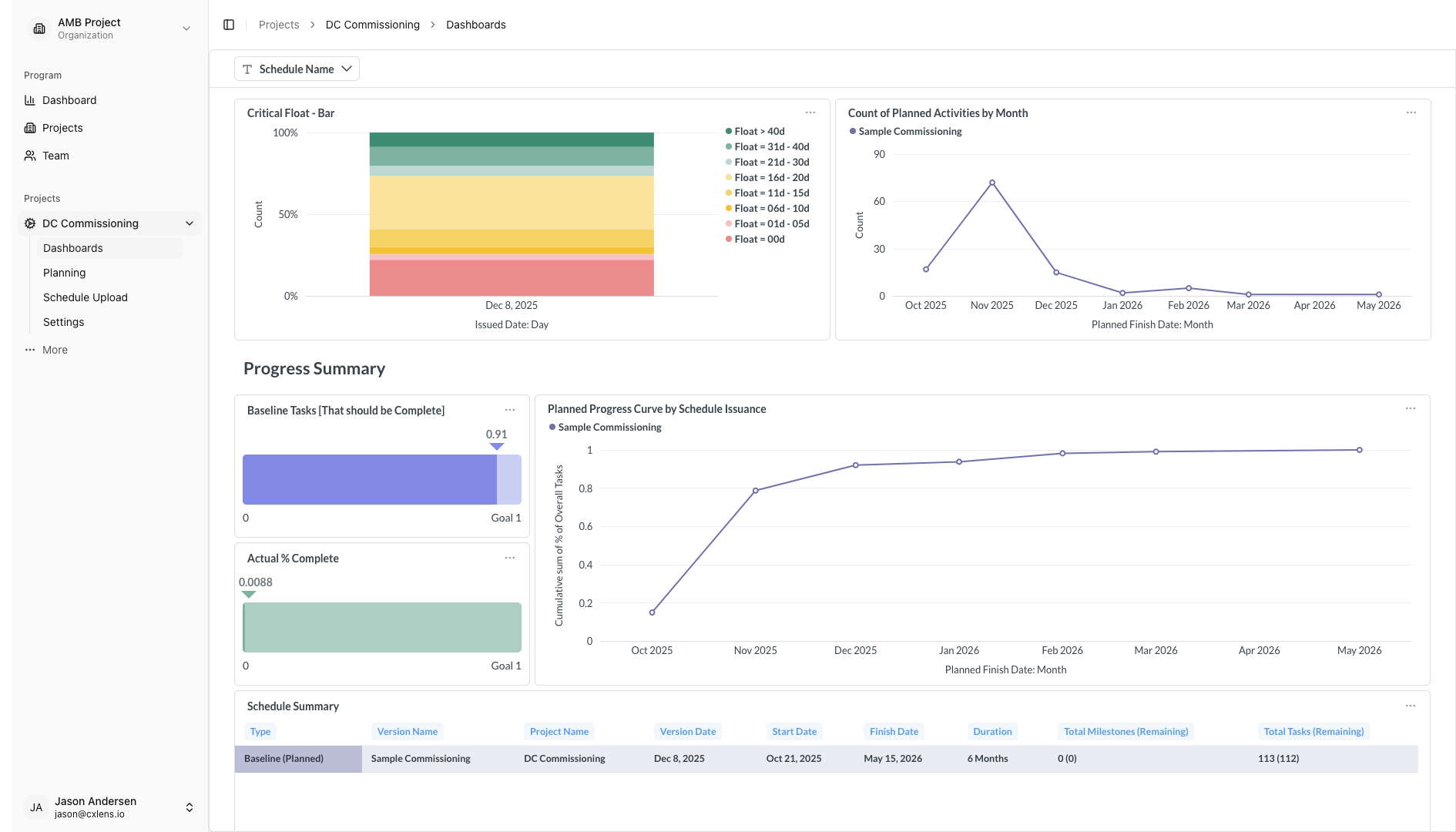
Each new schedule file is compared against your existing connections. Shifted activities flag their linked checklists as variances and prompt the team to review, and anything that needs re-connecting is highlighted.
Supported formats: Oracle P6 .xer (Professional and EPPM) and MS Project .xml exports (MS Project 2016 and later).
What you get
Independent planning dates
Your commissioning plan lives in CxLens, separate from the project schedule. If a system needs two more weeks of construction before pre-functional testing can start, you record that in the commissioning plan, not in P6. Plan by system, subsystem, or individual equipment tag, and the whole team sees the same dates.
Links to P6 and MS Project activities
Each commissioning date can be tied to a specific schedule activity. When that activity moves, the variance in your dashboards updates on its own, so nobody reconciles two spreadsheets by hand.
Schedule health on every upload
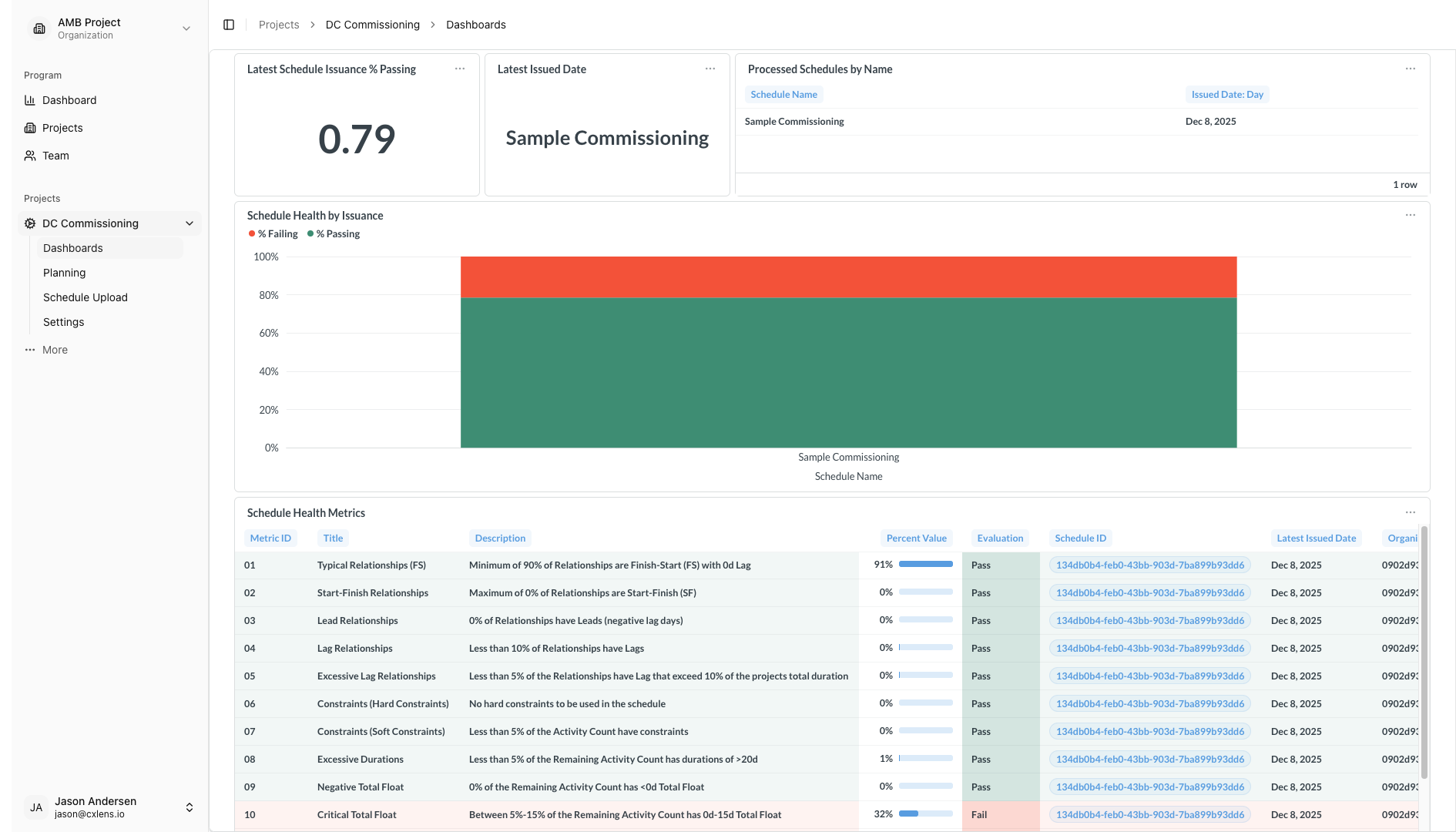
Every uploaded schedule is also analyzed for common scheduling issues such as logic gaps, excessive float, and missing baselines, with pass or fail results for each check.
Managed Scripts for repeatable planning
If your team follows a repeatable pattern, we can configure Managed Scripts during implementation: pull dates from a linked P6 activity, or apply a standard buffer to a set of checklists. Raise it in your discovery call and we will assess whether it fits.
See it in the product
Who uses it
Lead commissioning agents use independent planning to set dates from readiness and track variance against the schedule. Project schedulers get commissioning forecasts tied to task IDs, and know when the commissioning plan and the project schedule diverge. Commissioning managers see the result rolled up without assembling it by hand.
Schedule connection is one of three parts of CxLens. It is set up as part of an engagement around your schedule structure and update frequency, which we review in the free discovery call. See how an engagement works.
Go deeper
- Getting started: uploading a schedule and connecting checklists
- Schedule health dashboard documentation
- What is construction schedule health? A practical guide for commissioning teams
- Commissioning levels and integrated systems testing: why the schedule usually gets them wrong
More CxLens features
Talk to us about your project
We'll go through your commissioning challenges and tell you whether CxLens can help.
Or email us directly: hello@cxlens.io